
Virtual Image Organizer1.3 - Download
You'll be able to download in few seconds.
Publisher Description
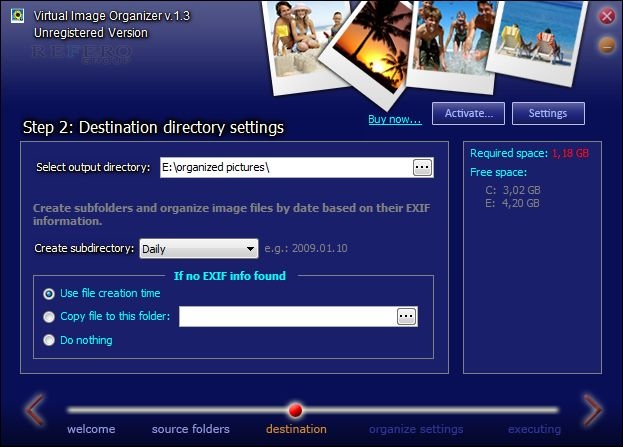
Virtual Image Organizer - Get your pictures from Digital Camera quickly, with fast renaming and re-organizing function, based on image Exif data
If you want TO rename and organize your photos quickly and comfortably, this software is THE MOST USEFUL for you.
Virtual Image Organizer is lightweight and extremely easy to use. It's software enables you to rename all of your image files based on their EXIF information.
Virtual Image Organizer also includes an Image Organizer agent, wich WILL automatically detect new usb volumes and drives, and you get a BALOON-Notification. This opens a wizard box that will take you though the process, only by clicking it. With this feature you can import files with an external drive (eg. Digital Camera).
The software also includes a nice Exif Filter feature. You can filter images by using EXIF informations (eg. Camera Model, ISO Speed Rating, F-Number...)
Software features:
-Fast picture renaming based Exif data
-Support of all Exif data( date picture taken, year, month, week, day, hour, second, size of photo, camera model, camera manufacturer, exposure, aperture, original filename, description, place, keywords, and many more)
-Image Organizer Agent wich automatically detect new USB drives and show information from this by a balloon hint.
-Easy definition of rules for renaming via filename mask (%y-year, %m-month, %c-camera model...)
-Processing of multiple directories including sub directories
-Export of Exif data as xml
-Integrated source folder details page with exif and fast thumbnail viewer
-Handles thousand of pictures just few seconds
-Free support via email
-Low price
About Virtual Image Organizer
This Gallery & Cataloging Tools program is available in English. It was last updated on 29 September, 2026. Virtual Image Organizer is compatible with the following operating systems: Windows.
The company that develops Virtual Image Organizer is SC Refero Group SRL. The latest version released by its developer is 1.3.
The download we have available for Virtual Image Organizer has a file size of 1.0 MB. Just click the green Download button above to start the downloading process. The program is listed on our website since 2009-02-19 and was downloaded 0 times. We have already checked if the download link is safe, however for your own protection we recommend that you scan the downloaded software with your antivirus. Your antivirus may detect the Virtual Image Organizer as malware if the download link is broken.
How to install Virtual Image Organizer on your Windows device:
- Click on the Download button on our website. This will start the download from the website of the developer.
- Once the Virtual Image Organizer is downloaded click on it to start the setup process (assuming you are on a desktop computer).
- When the installation is finished you should be able to see and run the program.
Program Details
System requirements
Download information
Pricing
Version History
version 1.3
posted on 2009-02-19
New interface design, some bugs corrected
Disclaimer
External Download
We do not host Virtual Image Organizer on our servers. We did not scan it for viruses, adware, spyware or other type of malware. This app is hosted by the software publisher and passed their terms and conditions to be listed there. We recommend caution when installing it.
The external download link for Virtual Image Organizer is provided to you by apps112.com without any warranties, representations or guarantees of any kind, so access it at your own risk.
If you have questions regarding this particular app contact the publisher directly. For questions about the functionalities of apps112.com contact us.
